Brand Guidelines
Learn how to create Built marketing materials that are consistent and impactful.
Logo
Concept
Our logo embodies simplicity and purpose. The logo mark features a stylized letter ‘b’ with angular strokes, evoking both dimension and the essence of a building. This minimalist design reflects our core mission: to simplify and streamline CRE management. Just as our logo distills a letterform’s structure into clean, bold lines, our platform transforms intricate processes into intuitive solutions.


Versions
Our logo’s simplicity gives it versatility in its usage at varying scales. In most cases the logo should be used with both the mark and word mark. In branding scenarios where space is small and confined (such as a social media avatar) the mark may be used by itself.

Full Color Logo | for light backgrounds

Black Logo | for light backgrounds
Full Color Reversed | for light backgrounds

Reversed Logo | for dark backgrounds

Logo Mark | for dark and light backgrounds
Usage
Always place the logo on simple or neutral backgrounds that ensure its legibility, especially at small sizes. Avoid using colors outside of Built’s brand color palette.
Do use the logo on cool, neutral backgrounds that provide substantial contrast with the logo colors.
Don’t use the logo on backgrounds that are outside of the brand color palette or will have low contrast with the logo.

Do use the logo over visually simple imagery where it can maintain it’s legibility.

Don’t place the logo over busy/detailed imagery.
Clear Space
When placing the logo be sure to leave clear space around the logo elements. This clear space can be approximated by dividing the logo mark into quarters and using the resulting quarter size to create a clear space margin around the logo’s silhouette.

Typography
Typefaces
Onest is our primary typeface, selected for its open, squared-off humanist characters that convey a friendly yet innovative feel. Inter serves as our secondary typeface, valued for its utilitarian range of dynamic weights, making it ideal for information-rich applications.
Onest
A B C D E F G H I J K L M N O P Q R S T U V W X Y Z
a b c d e f g h i j k l m n o p q r s t u v w x y z
1 2 3 4 5 6 7 8 9 0
Onest | Use for headings, subheadings, UI, and shorthand body copy. Available on Google Fonts here.
Inter
A B C D E F G H I J K L M N O P Q R S T U V W X Y Z
a b c d e f g h i j k l m n o p q r s t u v w x y z
1 2 3 4 5 6 7 8 9 0
Inter | Use for long for longform body copy. Available on Google Fonts here.
Headings
All headings should be set in Onest Bold or Semibold with tight line-height. When possible, headings should have a balanced rag with modest line widths to avoid typographic orphans and widows. In consideration of responsive design, large display headings should scale down for narrower screen widths.
H1 Heading
font-family: Onest
font-weight: bold
font-size: 60px
line-height: 100%
Your Cloud Platform for the Real Estate Lifecycle.
H2 Heading
font-family: Onest
font-weight: bold
font-size: 50px
line-height: 100%
Your Cloud Platform for the Real Estate Lifecycle.
H3 Heading
font-family: Onest
font-weight: bold
font-size: 40px
line-height: 110%
Your Cloud Platform for the Real Estate Lifecycle.
H4 Heading
font-family: Onest
font-weight: bold
font-size: 32px
line-height: 110%
Your Cloud Platform for the Real Estate Lifecycle.
H5 Heading
font-family: Onest
font-weight: bold
font-size: 20px
line-height: 120%
Your Cloud Platform for the Real Estate Lifecycle.
H6 Heading
font-family: Onest
font-weight: bold
font-size: 18px
line-height: 120%
Your Cloud Platform for the Real Estate Lifecycle.
Body Copy
Any medium to long form copy should be set in Inter and given moderately loose line height. When possible, body copy paragraphs should have a balanced rag with modest line widths and avoid typographic orphans and widows. Disable wrapping hyphens to prevent the breakup of long words, unless the copy is typeset in particularly narrow spaces. When copy is set in a format with multiple paragraphs, each paragraph should have bottom margins that are optically proportional to font size and line-height.
Large Body Copy
font-family: Inter
font-weight: regular
font-size: 18px
line-height: 150%
margin-bottom: 20px
We pursue big problems that can change the world for the better and make our customers more successful. We stretch our imagination to find innovative ways to solve problems. We know that the best ideas and the greatest opportunities for Built haven’t been thought of yet.
Everything starts with the customer. We work hard to deeply understand their needs and spend every day striving to deliver disproportionate value. Our goal is to be viewed as their most important partner.
Default Body Copy
font-family: Inter
font-weight: regular
font-size: 16px
line-height: 150%
margin-bottom: 20px
We pursue big problems that can change the world for the better and make our customers more successful. We stretch our imagination to find innovative ways to solve problems. We know that the best ideas and the greatest opportunities for Built haven’t been thought of yet.
Everything starts with the customer. We work hard to deeply understand their needs and spend every day striving to deliver disproportionate value. Our goal is to be viewed as their most important partner.
Blurb Copy
font-family: Inter
font-weight: regular
font-size: 14px
line-height: 140%
margin-bottom: 14px
We pursue big problems that can change the world for the better and make our customers more successful. We stretch our imagination to find innovative ways to solve problems. We know that the best ideas and the greatest opportunities for Built haven’t been thought of yet.
Everything starts with the customer. We work hard to deeply understand their needs and spend every day striving to deliver disproportionate value. Our goal is to be viewed as their most important partner.
Color
Palette
Our color scheme is designed to feel confidence-inspiring, intuitive, and friendly while also being innovative and forward-thinking through the use of cool, neutral tones, contrasted by vibrant accent colors and dynamic gradients.
Note on Color Accuracy for Print Design
Because Built is a software product, its brand color palette was designed with a screen-first approach. For print projects, color accuracy can vary depending on the vendor and materials. If precise color matching is critical, collaborate with a qualified print vendor to ensure the best results.

Primary Colors
Built’s core brand colors are a vibrant Red and a deep Navy. Our Red exudes energy and demands attention, perfect for highlighting key elements and calls-to-action. The Navy provides a sense of stability and professionalism.
Primary Red
SCREEN
Hex: #EB2134
RGBA: rgba(235, 33, 52, 1)
HSLA: hsla(354, 83, 53, 100%)
PRINT
CMYK: 0% 79% 72% 8%
PMS: PMS 185 C
Primary Navy
SCREEN
Hex: #0D1733
RGBA: rgba(13, 23, 51, 1)
HSLA: hsla(224, 59, 13, 100%)
PRINT
CMYK: 15% 11% 0% 80%
PMS: PMS 2380 C
Secondary Colors
Built’s palette offers two additional secondary blue tones chosen to amplify the dynamic interplay between vibrancy and stability established by our primary colors and offer greater depth and versatility to our brand.
Bright Blue

Deep Blue

Background Gradients
Built’s secondary colors can be adjusted to created dynamic background gradients that infuse Built’s visual identity with a sense of innovation and forward movement. These gradients can be used as backgrounds to offset product and lifestyle imagery or create composite branded graphic imagery.
Primary Background Gradient

Secondary Background Gradient

Background Colors
Product imagery can be placed on neutral gray or blue backgrounds, enhancing the visual prominence and readability of interface elements and information on each product screen.
Background Gray
Hex: #F7F7F7
RGBA: rgba(13, 23, 51, 1)
HSLA: hsla(224, 59, 13, 100%)
Background Blue
Hex: #F5F9FF
RGBA: rgba(235, 33, 52, 1)
HSLA: hsla(354, 83, 53, 100%)
Utility Accents
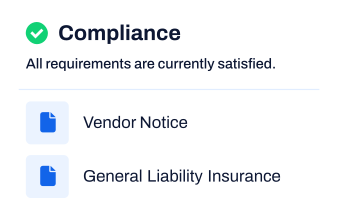
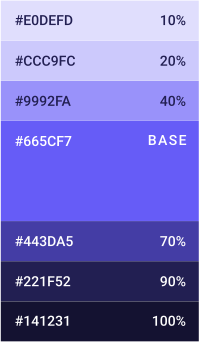
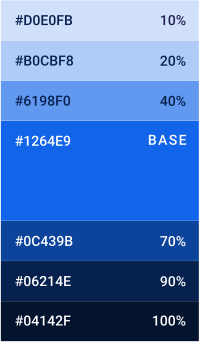
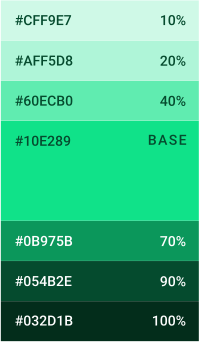
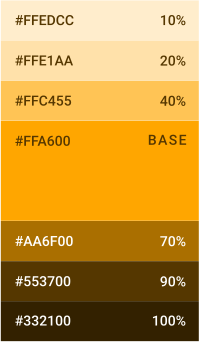
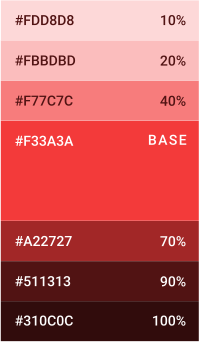
Built’s palette is supplemented by utility accent colors enhance our core palette with functional purpose. They can be used to provide clear visual cues that different product lines or within interfaces, data, and status indicators. A range of tints are presented to provide versatility and breadth to their use.
Brand Components
Product Imagery
When creating product imagery to showcase features and capabilities of the Built software platform, be sure to thoughtfully curate and, when necessary, simplify the user interface. This ensures that key features are emphasized, and that Built interface depicted in the image remains clear and legible, even when scaled down to smaller sizes, such as on mobile devices.
Floating Panels
When marketing features and capabilities, Built’s user interface can be separated and arranged into a floating panels, which helps to create a simple, yet dynamic, flowing composition that maintains clarity and visual richness.

Hero Product Image | Product images created for large full-width placements can support more a more dynamic arrangement of UI panels

Simplified Interface | Curate and simplify product images help to convey features in a format that works at different scales. These UI panels can be floated and arranged on top of a neutral background shape to provide the image with depth and dynamism.

Lifestyle + Product | Mix floating UI panels with lifestyle imagery to convey user satisfaction and connection with the Built platform.

Gradient Backgrounds | Use Gradient backgrounds to make panel clusters more eye-catching in hero areas or other high importance placements.

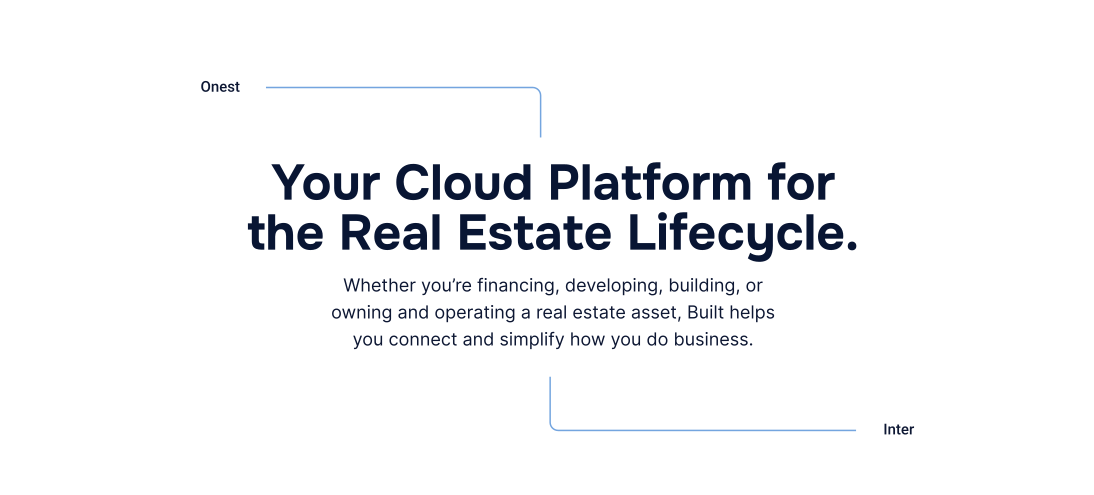
Connector Lines | Use connector lines to imply a streamlined user workflow or Built process.
Iconography
Built employs a diverse set of icons to highlight our platform’s features, capabilities, and benefits. Icons can quickly capture attention and convey a feature, while also become a unique identifier for an aspect of Built’s platform.


Financing

Managing

Developing

Building
Persona Use Icons | Developed to represent the primary uses of Built’s software platform







Feature Icons | Developed to highlight our platform’s features, capabilities, and benefits
Links and Buttons
Call to Action buttons are an integral part of our digital marketing. Buttons should be used to elicit action with short, imperative language. Button text should be as short as possible to reduce unintended wrapping on responsive screens, while button backgrounds should contrast strongly with the page background.
Get to Know Built
Learn how you can elevate your project performance with Built.
Standard Buttons | Built’s standard buttons have background fills that are set in our secondary colors: Bright Blue or Deep Blue. Add contextual text near a CTA button to avoid having long button text.
Get to Know Built
Learn how you can elevate your project performance with Built.
Outlined Buttons | In most cases avoid using two CTA buttons. If primary and secondary CTAs are necessary then use an outlined button for the secondary.
Get to Know Built
Learn how you can elevate your project performance with Built.
Take a Personalized Tour »
Already familiar with Built? Read our announcements in our latest news release.
Text Links | In scenarios where a call to action link is afforded a lower visual priority, or when the CTA is required to have a longer text content, use non-button text links. They should appear in a bold font weight. They should also either be underlined or contain a superseding » character or arrow icon.
Button Colors | Button colors can change depending on the underlying background. Make sure CTA buttons stand out and have readable text with strong contrast. Bright Blue and Primary Red are strong button colors for light backgrounds. White and Primary Red are strong button colors for dark backgrounds.
Resources
Ad Templates
Find templates for commonly used Built creative resources below.


Badge
Lorem ipsum dolor sit amet, consectetur adipiscing elit. Lorem ipsum dolor sit amet, consectetur adipiscing elit. Lorem ipsum dolor sit amet, consectetur adipiscing elit.
<div id="getbuilt-badge-light"></div>
<script src="https://getbuilt.com/embed/badge/light" defer=""></script>
<div id="getbuilt-badge-dark"></div>
<script src="https://getbuilt.com/embed/badge/dark" defer=""></script>