Post
Construction Draw Schedule: What It Is and How to Manage Draws Across a Portfolio
Draw Management
Learn More


A single delayed draw on a $50M project costs $5,800 per week in carrying costs at 6% interest. Multiply that across three to five active projects, and the gap between “submitted” and “funded” becomes the most expensive line item no one tracks. Construction project tracking software gives owners, developers, and general contractors a single source of truth for budgets, draws, compliance documents, and lender communication. Built, which manages $317B+ in real estate finance across 300+ lenders, is one platform purpose-built for this workflow.
This article covers what construction project tracking software does, why manual tracking fails at scale, and how to evaluate the right platform for a multi-project portfolio.
Construction project tracking software is a centralized platform that connects project budgets, draw requests, compliance documentation, and payment workflows into one system of record. It replaces fragmented spreadsheets and email chains with live data that owners, developers, GCs, and lenders can access on demand.
This category is different from general project management tools like Asana, Monday, or even field-focused construction platforms. Those tools track tasks, schedules, and RFIs. Construction project tracking software tracks money, including budget-to-actual variance, draw status, lien waiver compliance, and funding timelines.
For owners and developers running multiple projects simultaneously, the distinction matters. A missed task delays a punchlist item. A missed draw delays capital.
The financial tracking layer is what separates this software from everything else on the market. It connects the project to the lender and the accounting system, giving finance teams proactive visibility into where funds are, where they’re going, and what’s holding them up.
Spreadsheets work fine for a single project with a single lender. They stop working the moment an owner or developer scales past two or three active projects.
The data entry error rate on pay applications processed manually runs between 3%-5%. On a $25M project, that translates to $1M in potential billing errors. Those errors don’t just create rework. They trigger lender questions, delay draw approvals, and push funding cycles from days into weeks.
Draw cycles managed through spreadsheets and email typically stretch two to four weeks. Every week of delay is carrying cost that comes directly out of project margin. On a $50M project at 6% interest, that’s $5,800 per week sitting in a lender’s queue because someone is chasing a missing lien waiver or re-keying an invoice into a budget tracker.
The compliance problem compounds with scale. Each project has its own lender requirements, waiver templates, inspection schedules, and reporting formats. A three-project portfolio might involve 60+ subcontractors, each with conditional and unconditional waivers due every pay cycle. Tracking that in a spreadsheet creates direct legal and financial exposure.
Manual tracking doesn’t cause every overrun, but it makes the problem invisible until it’s too late to correct.
Real-time construction progress tracking for owners and developers involves six core workflows.
The goal goes beyond visibility. Real-time tracking catches problems before they cost money. A draw that sits unsubmitted for five days because a waiver is missing costs the same as a draw that sits unsubmitted because no one noticed it was ready. Real-time tracking eliminates both failure modes.
According to Deloitte’s 2025 Commercial Real Estate Outlook, 81% of CRE leaders are investing in technology to improve operational efficiency. Construction progress tracking is where that investment has the most direct impact on cash flow.
Not every platform covers the full lifecycle. When evaluating best construction project tracking software for owner-developers, these are the capabilities that separate purpose-built financial tracking from general project tools.
| Capability | Why It Matters |
|---|---|
| Draw automation | Reduces draw assembly from days to hours. Eliminates manual re-keying and formatting errors. |
| Budget tracking with change order management | Keeps budget-to-actual variance visible in real time rather than waiting for month-end close. |
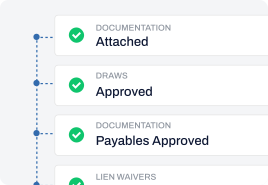
| Lien waiver automation | Prevents payment delays caused by missing or unsigned waivers. Tracks conditional and unconditional waivers for each subcontractor and payment period. |
| Lender connectivity | Submits draw packages directly to the lender’s system, eliminating email-based draw submission. |
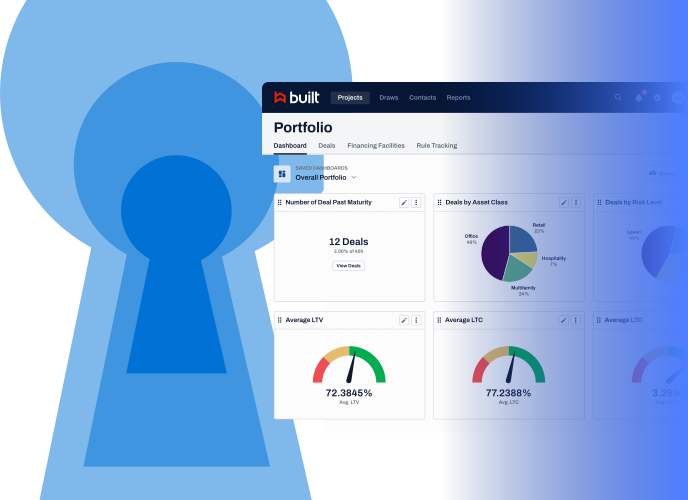
| Portfolio dashboards | Gives executives a single view of capital position, draw pipeline, and compliance status across all active projects. |
| ERP integration | Connects with systems such as Sage Intacct, Yardi, QuickBooks, and other accounting platforms without replacing them. The tracking platform serves as the front end to the ERP, not a replacement. |
When evaluating platforms, ask whether the system connects to your lender directly. A tool that automates draw assembly but still requires you to email a PDF to your lender only solves half the problem.
Also consider whether the platform supports both owner and GC workflows. On most projects, the owner submits a draw to the lender, and the GC submits pay applications to the owner. If those two processes live in separate systems, reconciliation becomes another manual task.
For a broader view of financial tracking across the project lifecycle, see our guide to construction finance management software.
Built connects the full draw lifecycle in one platform, from the GC’s pay application through the owner’s draw request to the lender’s funding decision. It’s the only platform where the owner’s draw connects to the same system the GC and subcontractors are using, which eliminates the reconciliation gap that slows most portfolios.
Here’s how its capabilities map to the evaluation criteria above.
ERP integration. Built is the front door to your ERP. It integrates with Sage Intacct, Yardi, QuickBooks, and other accounting systems, syncing financial data without replacing your system of record.
The results show up in how customers describe the experience.
According to a representative from Copper Builders, “I can see all of my jobs really in one snapshot.”
According to Janna Ryan, CFO at John Kraemer & Sons, “Built is very cost effective in the time saved but more importantly in eliminating potential errors in billings.”
According to Jake Barone, President at Gateway Construction, “I love the service. It’s been a lifesaver and provided extreme time savings and better compliance.”
For owners and developers evaluating construction draw software, the lender network is the differentiator. A platform that automates your internal workflow but doesn’t connect to your lender leaves the most expensive bottleneck untouched. Built’s construction financials platform closes that gap.
Every week of manual draw processing is carrying cost that comes out of your margin. Every missing lien waiver is a payment delay that strains your relationship with trade partners. Every reconciliation spreadsheet is a version control problem waiting to surface during an audit.
The cost of staying manual hits every project in the portfolio. That $5,800 per week on a $50M project multiplies across every active deal.
Talk to our team to see how Built tracks construction projects from pre-close to stabilization. Or see it in action with a live walkthrough of your specific project type and lender requirements.
Construction project tracking software is a centralized platform that monitors budgets, draw requests, compliance documents, and payment workflows across construction projects. It replaces manual spreadsheets with live data, giving owners, developers, GCs, and lenders a single source of truth for project financials.
General project management tools track tasks, schedules, and deliverables. Construction tracking software tracks money, including budget-to-actual variance, draw status, lien waiver compliance, and funding timelines. The financial layer is the key difference, connecting the project to both the lender and the accounting system.
Real-time cost tracking involves connecting every invoice, change order, and committed cost to budget line items as they’re entered. The system calculates variance automatically and surfaces it on a dashboard, rather than requiring manual reconciliation at month-end. Draw status, inspection progress, and compliance gaps are also visible in real time.
Budget overruns happen when variance goes undetected. Tracking software catches overruns early by comparing actual costs against the approved budget in real time. Change orders update the budget immediately, and draw requests reconcile against the latest approved numbers before submission to the lender.
Construction tracking software manages lien waivers (conditional and unconditional), insurance certificates, sworn statements, and lender-required inspection reports. It tracks these documents per subcontractor, per pay period, and per project, flagging missing items before they delay a draw or a payment.
Start with lender connectivity. If the platform can’t submit draws directly to your lender, you’re still emailing PDFs. Then evaluate budget tracking, draw automation, lien waiver management, and portfolio-level dashboards.
Integration with your existing ERP determines whether you get clean data or another reconciliation task. The platform should sit in front of your accounting system, not replace it.

Built gives your team unified dashboards and real-time visibility from pre-close planning through stabilization.